On 21 October 2026 PHP released emergency fixes for two critical flaws that can let an attacker run commands on a web server without logging in. PHP powers WordPress, WooCommerce and many hosting control panels, so a lot of small business websites depend on it. The NCSC and the NSA gave the same advice: update now, and if you cannot, consider taking the system offline. This guide sets out what a small business without a security team should do this week, and how to stay ready for the next one.
- Fixed versions are out. PHP 8.2.35, 8.3.36, 8.4.27 and 8.5.12 close both flaws. Anything earlier is exposed.
- Ask your host, do not assume. Get the PHP version of every site in writing, including old and test sites.
- Cannot update? Mitigate or switch off. The NCSC and NSA both say to consider taking the system offline.
- Patching is not the end of it. A server attacked before the update may already hold a backdoor.
- Most of the long-term fix is free. NCSC tools and Cyber Essentials cover the basics for a few hundred pounds.
CVSS v4 severity score for both flaws, out of 10
PHP security advisoriesof UK businesses have a policy to patch within 14 days
DSITof UK businesses have a formal incident response plan
DSITless likely to make a cyber insurance claim with Cyber Essentials
NCSCWhy a web server flaw is a business problem
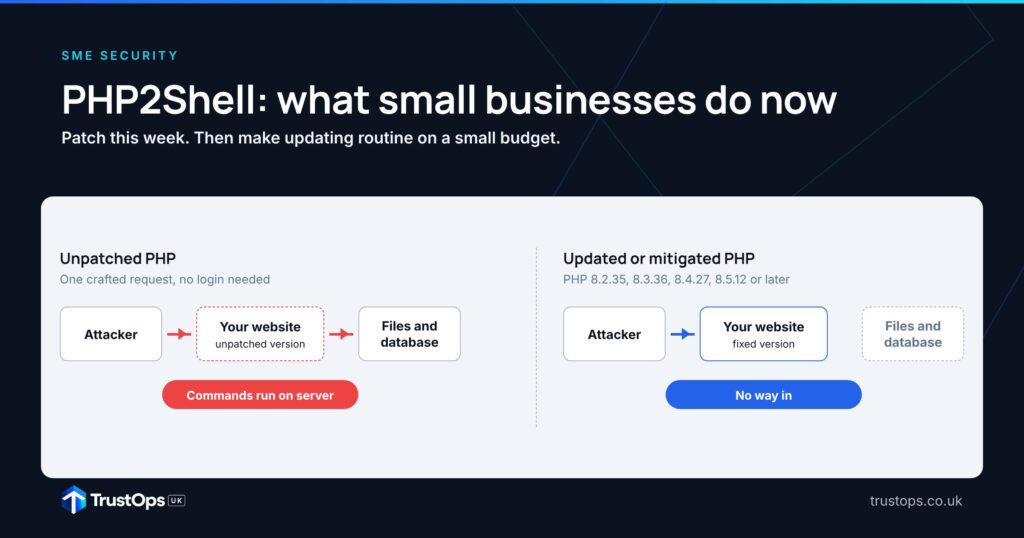
One web request, no login, and the attacker is on your server
An updated or mitigated PHP handles the same request safely.
TrustOps UK illustration, based on the NCSC alert and NSA advisory of 21 October 2026.
43% of UK businesses were breached or attacked last year
Few have the routines that make a week like this one manageable.
Share of UK businesses. Bars scaled to the largest value. Source: DSIT Cyber Security Breaches Survey 2025/2026.
Small firms gained on tools but lost ground on planning
Change from 2024/2025 to 2025/2026, in percentage points.
Bar length shows relative size of change. Source: DSIT Cyber Security Breaches Survey 2025/2026.
From warning to emergency patch
The NCSC predicted a wave of urgent fixes. This is one of them.
Sources: NCSC; PHP security advisories; NSA.
Where patching should be heading
Patch and exposure management mapped to the TrustOps Maturity Model.
Nobody owns updates
Host patches, no list of sites
Site list, 14-day patching, Early Warning
Patch times tracked, Cyber Essentials
Update by default, tested recovery
TrustOps UK analysis.
Graphics advance automatically. Hover or select a tab to pause.

What happened
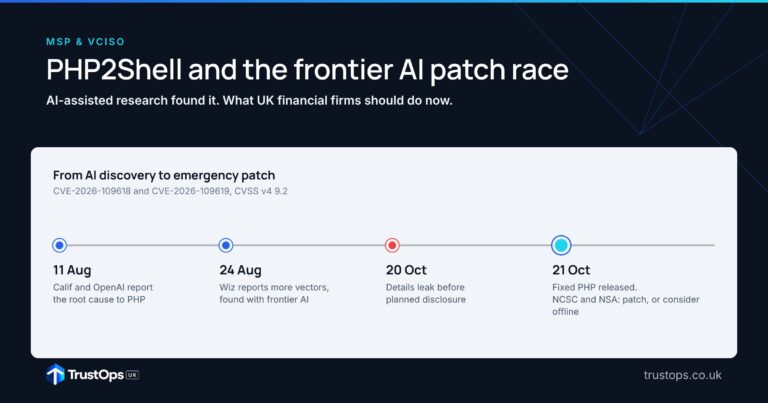
On 20 October, details of two critical PHP flaws appeared online before their planned disclosure. PHP’s security team brought its release forward and published fixed versions on 21 October. The flaws are tracked as CVE-2026-109618 and CVE-2026-109619, and both score 9.2 out of 10 on the CVSS v4 scale.
- What they do. An attacker can push PHP into an out-of-memory state that corrupts its memory. The NCSC says this could, under certain conditions, allow unauthenticated remote code execution.
- What “unauthenticated” means for you. The attacker needs no username or password, only the ability to send a request to your website.
- What the attacker gets. The NSA notes that flaws like these often give a direct path to the server’s files or database: customer records, orders, and the site itself.
- How urgent it is. NCSC-NL reports multiple public proof-of-concept exploits and considers large-scale exploitation likely in the short term.
Why this matters for small businesses
You may be running PHP without knowing it
PHP sits underneath WordPress, WooCommerce, Joomla, Drupal and Magento, and inside many hosting control panels, booking systems and network appliances. The NCSC specifically warns about appliances and services that bundle PHP as a component. The forgotten sites are the risky ones: an old campaign microsite, a staging copy, a supplier portal nobody has logged in to for a year.
Most small firms are not set up for a week like this
According to DSIT, 43% of UK businesses reported a breach or attack in the last year, rising to 46% of small businesses. Only 34% have a policy to apply security updates within 14 days, and only 25% have a formal incident response plan. Among small businesses, continuity plans that cover cyber security fell from 53% to 44%.
If you are unable to apply the temporary mitigations, or applying them would take too long, you should consider taking the system offline until it can be fully mitigated.
NCSC, Critical security issue affecting PHP, 21 October 2026Who patches what
Responsibility is shared, so confirm it in writing
On shared or managed hosting the provider usually updates PHP. On your own server or virtual machine, that job is yours or your IT provider’s.
Whoever applies the update, the decision to take a site offline and the list of what you run stay with the business. A host can only patch what it knows about.
What to do in the next 72 hours
- List every website and system that could run PHP. Main site, online shop, old and test sites, booking and client portals, and the admin pages of any network or storage appliances.
- Ask your host or IT provider, in writing, which PHP version each one runs. You are looking for 8.2.35, 8.3.36, 8.4.27, 8.5.12 or later, or a supplier backport that includes the fix.
- If you manage the server, update and restart. Update PHP, then restart the web and PHP services so the fixed version is actually running.
- Cannot update today? Apply PHP’s temporary mitigations. These include disabling session upload progress (
session.upload_progress.enabled=0) and restarting workers. PHP is clear that updating is the only complete fix. - Still exposed? Take it offline. A holding page on a separate service costs far less than a compromised server.
- Check for signs of compromise. Look for unfamiliar files in web folders, new admin accounts, new scheduled tasks and unusual outbound traffic. If you are not confident doing this, the NCSC points to its assured Cyber Incident Response providers.
Sites on PHP 8.1 or earlier are a separate problem. PHP no longer supports them, so plan a move to a supported version rather than relying on workarounds.
Where SME patching goes wrong
01“Our host handles it”
Often true for the main site on managed hosting. Rarely true for a virtual server, a developer’s test copy or an appliance in the comms cupboard.
02Patching PHP but not what sits on it
The PHP update fixes PHP. Plugins, themes and bundled products need their own updates, and some vendors will ship them later.
03Forgetting the old sites
Old microsites and staging copies tend to run old PHP, and nobody is watching them.
04Treating the update as the finish line
If a site was attacked before it was updated, a backdoor survives the patch.
Going forward: security on a small budget
This will not be the last emergency patch. In May the NCSC’s Chief Technology Officer warned that artificial intelligence is showing the ability to exploit old software weaknesses “at scale and at pace”, and told organisations to prepare for a wave of urgent updates. His advice is to adopt a policy to “update by default”: apply updates as soon as possible, and automatically where you can. In our view, that is the single most useful habit a small business can build.
Start with what is free
- NCSC Early Warning. Free for any UK organisation. It emails you when your internet addresses show signs of compromise, vulnerable services or open ports.
- NCSC Cyber Action Toolkit. A free, personalised list of actions for sole traders and small firms, building towards Cyber Essentials.
- A free Cyber Advisor session. A 30-minute consultation with an NCSC-assured adviser on how Cyber Essentials applies to you, for firms with fewer than 250 staff that have not held Cyber Essentials before.
- Exercise in a Box. A free NCSC exercise to test how your team would respond to an incident like this one.
Then spend a little: Cyber Essentials
Cyber Essentials covers five technical controls, including applying high-risk and critical security updates within 14 days. Organisations with it are 92% less likely to make a cyber insurance claim, according to the NCSC. Self-assessment costs £320 plus VAT for micro organisations and £440 plus VAT for small ones. Only 5% of UK businesses hold it, so it also marks you out with customers.
Then make it routine
This week’s fix, then a 12-month plan
Indicative timescales for a business with an external IT provider or host.
| Budget | What to do | Cost |
|---|---|---|
| Nothing | Early Warning, Cyber Action Toolkit, Cyber Advisor session, Exercise in a Box, switch off unused sites | Free |
| Low | Cyber Essentials self-assessment | £320 + VAT (micro) · £440 + VAT (small) |
| Moderate | Managed hosting with automatic PHP updates, help from a Cyber Advisor, Cyber Essentials Plus | Varies by supplier |
| Evidence to keep | Site list with PHP versions, patch dates, supplier confirmations, a one-page response plan | Your time |

Four questions for your next board meeting or IT review
Where do you stand?
A current list of sites, updates within 14 days and Early Warning in place is a Level 3 (Managed) capability. Tracking patch times and holding Cyber Essentials is Level 4 (Measured). Updating by default, with recovery you have actually tested, is Level 5 (Optimised). Many small businesses sit at Level 2: the host patches, but nobody holds the full picture.
A TrustOps Framework Assessment maps your controls against the model and gives you a costed, sequenced plan sized for a small business. Or start with the free 15-minute assessment.
Sources (13 primary sources)
- NCSC, Critical security issue affecting PHP (21 Oct 2026)
- NSA, NSA Advisory: PHP Updates (21 Oct 2026)
- PHP, Security advisory GHSA-w8hw-w9fx-j79w (CVE-2026-109618)
- PHP, Security advisory GHSA-6wmf-4rv5-p3rp (CVE-2026-109619)
- NCSC-NL, php2shell operational information and affected products
- NCSC, Preparing for a ‘vulnerability patch wave’ (1 May 2026)
- DSIT, Cyber Security Breaches Survey 2025/2026 (30 Apr 2026)
- NCSC, A decade of Cyber Essentials
- NCSC, Cyber Essentials overview
- NCSC, Early Warning
- NCSC, Small businesses to receive cyber security boost with new toolkit (14 Oct 2025)
- NCSC, Helping small businesses with free hands-on cyber consultancy (Jul 2026)
- IASME, Cyber Essentials FAQ: pricing
General information, current as of 21 October 2026. The situation is moving quickly; check the NCSC and PHP advisories for updates. Not legal or regulated compliance advice.