“Free” makes people suspicious, and rightly so. A free security assessment often turns out to be a scan that finds alarming-looking problems only the seller can fix, or a thin questionnaire designed to get your email onto a list. This is not that. This page explains exactly what our free 15-minute assessment checks, how the scoring works, and what you walk away with — so you can decide whether it is worth a quarter of an hour before you spend any of it.
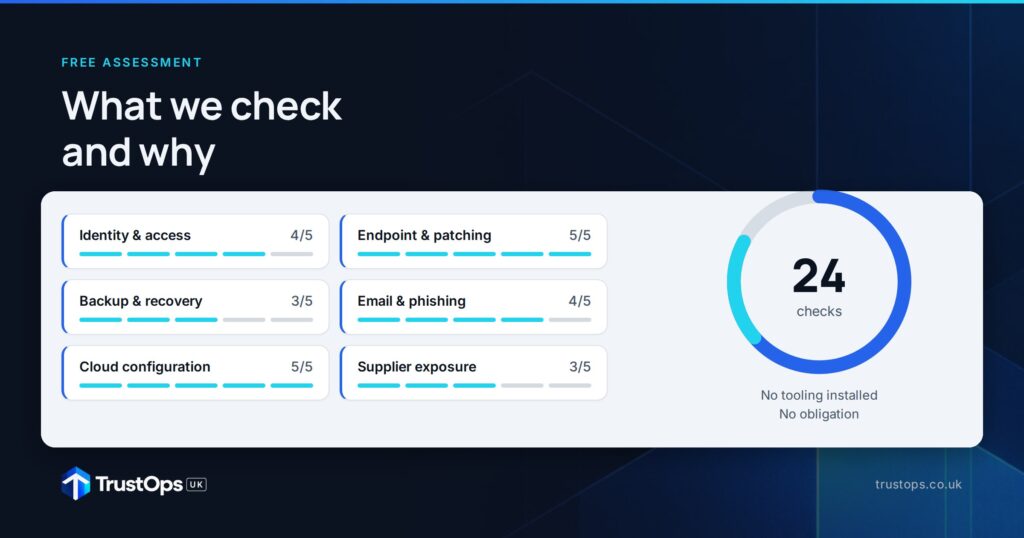
The short version: you answer 25 plain-English questions, you get a score out of 100, a maturity level, and your top five gaps in priority order. It is genuinely useful whether or not we ever work together. Here is how it works, and why we built it this way.
Why six areas, not a shopping list of tools
Good security is not a pile of products; it is a small number of things done consistently. We structure the assessment around the six functions that underpin the internationally recognised NIST Cybersecurity Framework 2.0 — Govern, Identify, Protect, Detect, Respond and Recover. These are not jargon for their own sake. They are the six questions any sensible owner should be able to answer about their business, and they are the same lens a serious customer or insurer uses.
Govern: is anyone actually in charge?
We check whether one named person is accountable for security, whether written policies exist and staff have actually seen them, and — increasingly important — whether you have any rules about what data staff can put into AI tools like ChatGPT or Copilot. Governance is where most small firms have a quiet gap: everyone assumes someone else owns it.
Identify: do you know what you are protecting?
You cannot protect what you cannot see. We ask whether you have a current list of the laptops, servers and cloud services the business uses, whether you know which suppliers hold your data and whether you have checked their security, and whether you know your single most critical system and how long you could survive without it. These are the questions that turn an abstract worry into a concrete list.
Protect: are the basics really in place?
This is the largest area, because it is where routine attacks are stopped. We check the controls that matter most: multi-factor authentication on email and remote access for everyone with no exceptions; admin rights limited to those who need them; security patches applied within 14 days; firewalls and changed default passwords; leavers’ accounts removed the day they go; device encryption; and whether staff have had any security awareness training in the last year. Microsoft has reported that multi-factor authentication alone blocks the overwhelming majority of account-compromise attacks, which is why it carries real weight in the score.
Detect: would you know?
We ask whether you would know within 24 hours if someone logged into your email from another country, whether logs are kept for key systems and anyone ever looks at them, and whether endpoint protection is installed and centrally visible on every device. Detection is the difference between catching an intruder in hours and reading about your breach from a customer weeks later.
Respond: is there a plan for the bad day?
We check whether there is a written plan for the first hour of an incident, whether everyone knows who to call including out of hours, whether you have ever rehearsed even a 30-minute tabletop exercise, and whether you know your legal reporting duties — the Information Commissioner’s Office must be told within 72 hours of a personal data breach that poses a risk to individuals. A plan you have never rehearsed is a document, not a capability.
Recover: could you come back?
Finally, we check the things that decide whether an incident is a bad week or an existential one: whether backups are automatic with at least one copy offline or immutable, whether you have actually restored from backup in the last six months to prove it works, whether your critical system could be rebuilt from instructions that exist outside one person’s head, whether you have cyber insurance and know what it requires, and whether staff could work securely from elsewhere if the office were unavailable tomorrow.
How the scoring works
Each of the 25 questions is scored on a simple three-point scale — No, Partly or Yes — and the totals roll up to a score out of 100. That score maps to one of five levels on the TrustOps Maturity Model:
- 0–20: Level 1, Ad hoc — no formal controls; security is whoever happens to notice.
- 21–40: Level 2, Foundations — Cyber Essentials-style controls in place.
- 41–60: Level 3, Managed — policies live and monitored.
- 61–80: Level 4, Measured — metrics, testing and drills.
- 81–100: Level 5, Optimised — continuous assurance.
We then pull out your top five gaps — the lowest-scoring areas, ordered so that the controls that stop the most damage come first. That ordering matters: two firms can score the same and need completely different next moves, and a ranked list of five is something you can act on, rather than a page of amber boxes you will ignore.
A worked example makes this concrete. A typical 30-person firm we assess has MFA on email but not on every remote-access route, decent antivirus but no central visibility, backups that run nightly but have never been test-restored, and no written incident plan. That firm often lands around the high 40s — Level 3, Managed — with its top five gaps clustered in Detect and Recover. The score is not a verdict; it is a starting point that tells the owner exactly which two or three things to do first, and roughly what each is worth.
What you get — and the catch (there isn’t one)
You get a score out of 100, your maturity level, and your prioritised top five gaps, delivered clearly enough to take to a board or a customer. It is yours to keep and act on however you like — with us, with your existing IT provider, or on your own. We built it this way deliberately: a firm that understands where it stands makes better decisions, and the ones that decide to work with us do so because the assessment was useful, not because it frightened them. No fear-selling, no invented findings.
A sensible next step
Fifteen minutes, 25 questions, a score out of 100 and your top five gaps — whether or not we ever speak again. Start with the free assessment at trustops.co.uk/.
Sources
NIST — Cybersecurity Framework 2.0 (Govern, Identify, Protect, Detect, Respond, Recover): https://www.nist.gov/cyberframework
Microsoft — Multi-factor authentication blocks the vast majority of account-compromise attacks: https://www.microsoft.com/en-us/security/blog/2019/08/20/one-simple-action-you-can-take-to-prevent-99-9-percent-of-account-attacks/
Information Commissioner’s Office — Personal data breaches: a guide (72-hour reporting duty): https://ico.org.uk/for-organisations/report-a-breach/personal-data-breach/personal-data-breaches-a-guide/
IASME / NCSC — Cyber Essentials five control themes: https://www.ncsc.gov.uk/cyberessentials/overview