UK banks have spent a decade on Zero Trust, endpoint detection and cloud controls. The most common way in is still an email. Phishing is the attack UK businesses report most often, and in banking a convincing message can do more than steal a password. It can redirect a payment, hand over a live session or start a ransomware incident. The useful question is no longer how to block phishing, but how to make sure one email cannot become a material incident.
- Phishing is still the front door. 38% of UK businesses were hit last year, the most common attack by far.
- Many attacks carry no malware. They ask someone to sign in, approve a prompt or change bank details.
- Email can start a request, not approve it. Payment and access changes need a separate, trusted check.
- Your domain protects your customers. DMARC at “reject” stops criminals sending as you, and NCSC Mail Check has closed.
- It is an operational resilience issue. PRA incident reporting rules apply from 18 March 2027.
of UK businesses experienced phishing in the last 12 months
DSITof businesses hit by cyber crime were phishing victims
DSITlost to authorised push payment fraud in 2025, up 19%
UK Financelost to invoice, mandate and CEO fraud in 2025
UK FinanceWhy one email can still become a banking incident
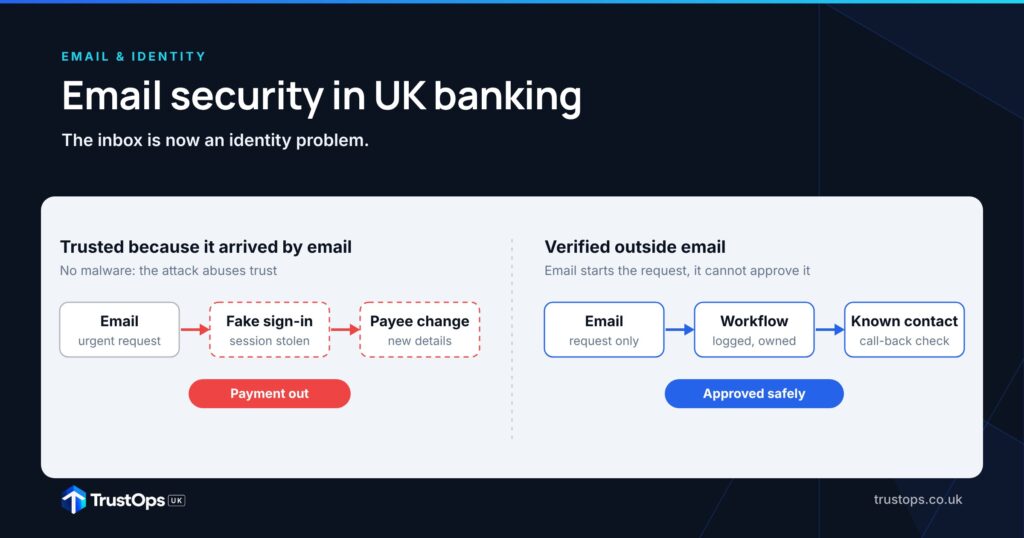
From inbox to payment in four steps, and the control that breaks each one
No malware needed. Each step abuses trust, not a software flaw.
TrustOps UK illustration of a business email compromise path.
Phishing is the attack firms meet most
Share of UK businesses, last 12 months.
Source: DSIT Cyber Security Breaches Survey 2025/2026.
Email-led payment fraud is falling, but still costs £46.9m
Authorised push payment fraud, 2025.
Change 2024 to 2025. CEO fraud bar capped for scale. Source: UK Finance Annual Fraud Report 2026.
The dates that make email a resilience issue
Regulation and services that changed what firms must own.
Sources: FCA; NCSC; DSIT; Bank of England / PRA.
Where email security should be heading
Email security mapped to the TrustOps Maturity Model.
Filtering and training
DMARC at reject, phishing-resistant MFA for approvers
Email, identity and mailbox signals joined up
Sensitive actions verified outside email by design
TrustOps UK analysis.
Graphics advance automatically. Hover or select a tab to pause.

Phishing has changed shape
Old phishing was easy to spot: poor spelling, odd attachments, strange sender addresses. The current version is quieter. Attackers research a target’s role, reporting line and suppliers first, and generative AI makes a well-written, convincing message cheap to produce.
The result often contains no malware at all. It asks someone to sign in to a look-alike page, accept a push prompt, change a supplier’s bank details or send a file. Among UK businesses that had a breach, the share that saw phishing and nothing else rose from 45% to 51% in a year.
In our view, that makes email security mainly an identity and business process problem, with filtering as one layer of several.
Business email compromise in a bank
Business email compromise works by pretending to be someone trusted, not by exploiting a technical flaw. The common patterns:
- Executive impersonation. An urgent request for a transfer or confidential data.
- Supplier compromise. A real supplier mailbox is taken over and an existing thread is hijacked.
- Invoice or mandate change. Bank details are swapped on a genuine-looking invoice.
- Internal account takeover. The attacker writes from a real colleague’s account.
- Service desk manipulation. Support staff are talked into resetting credentials or MFA.
UK Finance recorded £41.3 million lost to invoice and mandate scams and £5.6 million to CEO fraud in 2025. Both are falling, which suggests payee checks and staff awareness are working. Neither has gone away, and both still rely on someone trusting an email.
Protect your own domain
Criminals impersonate banks to reach customers, so domain protection is a fraud and trust control as well as a security one. The NCSC recommends three standards used together:
- SPF lists the servers allowed to send email for your domain.
- DKIM signs outgoing mail so receivers can check it is genuine and unchanged.
- DMARC tells receivers what to do with mail that fails those checks, and sends you reports.
As soon as you are confident DKIM and SPF are continuing to work correctly, you should move to a DMARC policy of ‘reject’.
NCSC, Email security and anti-spoofing guidanceFor a banking group the hard part is discovery. Mail goes out from Microsoft 365, marketing platforms, CRM, HR systems, customer notification services, fraud tools, agencies and older applications. DMARC reports show every one of them, which makes them useful for finding shadow IT and forgotten suppliers too. The NCSC also advises locking down domains that never send email, so dormant domains cannot be used against your customers.
One change to note: the NCSC retired its Mail Check service on 31 March 2026. Firms that relied on it for DMARC reporting now need their own monitoring. The NCSC’s free Check your cyber security service still includes an email security check.
A practical route to DMARC “reject” for a banking group
Indicative timescales. They depend on how many platforms send mail as you and how quickly owners fix them.
Treat the inbox as untrusted
A Zero Trust principle applies directly: receiving an email should not create trust. The sender may look right and the account may be genuine, but the message alone should not authorise anything sensitive. High-risk actions need checking through a separate, trusted channel, ideally a workflow rather than a reply to the same thread:
- supplier or customer bank detail changes
- high-value payments and payroll changes
- privileged access requests and credential resets
- release of confidential information
Email can start the request. It should not be able to approve it.
Identity is now part of email security
Gateways still matter for malicious links, attachments and known campaigns. But the most damaging email attacks now go after the identity behind the mailbox.
Phishing-resistant sign-in
The NCSC says that where services support passkeys, “they should generally be used”. Start with administrators, executives, finance teams, the service desk and anyone who can approve payments.
Conditional access
Sign-in decisions should weigh device health, user and sign-in risk, location and unusual behaviour. A suspicious email followed by an odd sign-in should be treated very differently from either on its own.
Separate admin accounts
Privileged identities should not be used for email, so a compromised mailbox does not hand over the infrastructure.
Watch the mailbox after sign-in
A successful sign-in does not mean a safe session. Attackers steal session tokens, request OAuth consent and set up inbox rules that hide security alerts, forward mail outside the firm or delete replies in a payment conversation. Alerts worth having:
- new external forwarding rules
- unusual OAuth app consent or mailbox delegation
- mass deletion of messages
- inbox rule changes shortly after an unusual sign-in
Join these signals up with business context: can this person approve payments or administer systems? That turns “is this email malicious?” into the more useful question, “what happens to the business if it works?”
An operational resilience issue
The FCA defines operational resilience as the ability to “prevent, adapt and respond to, and recover and learn from operational disruption”. Firms had until 31 March 2025 to show their important business services could stay within impact tolerances. The PRA’s 2026 priorities letter names cyberattack as one of the two most frequently cited sources of risk for deposit takers.
Email belongs in those scenarios. Banks should know which important business services depend on email, which critical suppliers send operational instructions by email, how they would operate if email were unavailable or untrustworthy, and how a compromised identity would be contained. PRA policy statement PS7/26 on operational incident and third-party reporting applies from 18 March 2027.
| Control | Evidence for the board |
|---|---|
| Domain protection | % of domains, including non-sending ones, at DMARC “reject” |
| Identity | % of payment approvers and admins on phishing-resistant MFA |
| Mailbox monitoring | Time to detect a new external forwarding rule |
| Payment verification | % of payee changes verified outside email |
Where email security goes wrong
01DMARC stuck at “none”
Monitoring only, for years, because nobody owns every sending platform.
02Strong MFA everywhere except the service desk
If a reset can be talked through on the phone, the attack moves to the phone.
03Verifying a payee change by replying
A reply goes straight back to the attacker who controls the thread.
04Mailbox rules nobody watches
A forwarding rule can sit quietly for months and copy every payment conversation.

Four questions for your next board or ExCo
Where do you stand?
DMARC at reject, with phishing-resistant MFA for privileged staff and payment approvers, is a Level 3 (Managed) capability. Email, identity and mailbox signals joined up and measured is Level 4 (Measured). Sensitive actions verified outside email by design, and tested against impact tolerances, is Level 5 (Optimised).
A TrustOps Framework Assessment maps your controls against the model and gives your board a costed, sequenced plan. Or start with the free 15-minute assessment.
Sources (11 UK primary sources)
- DSIT, Cyber Security Breaches Survey 2025/2026 (30 Apr 2026)
- UK Finance, Fraud report 2026 press release (15 Jun 2026)
- UK Finance, Annual Fraud Report 2026
- NCSC, Email security and anti-spoofing
- NCSC, Reject spoof emails
- NCSC, Protecting parked domains
- NCSC, Retiring Mail Check and Web Check
- NCSC, Passkeys are more secure than traditional ways to log in (23 Apr 2026)
- FCA, Operational resilience
- Bank of England / PRA, PS7/26 Operational incident and third-party reporting (18 Mar 2026)
- PRA, UK deposit takers supervision: 2026 priorities (15 Jan 2026)
General information, current as of October 2026. Not legal or regulated compliance advice. Verify against current primary sources.